


Onboard via Modals
An email reaches the customers you already have. A sign-up modal reaches the people who are on your store right now. It is a small popup that invites visitors to join your loyalty program, right from your store, at the moment they are already browsing your products.
The idea is the same as with an email: tell visitors you have a loyalty program, and always give them a reason to join.
Lead with the reward
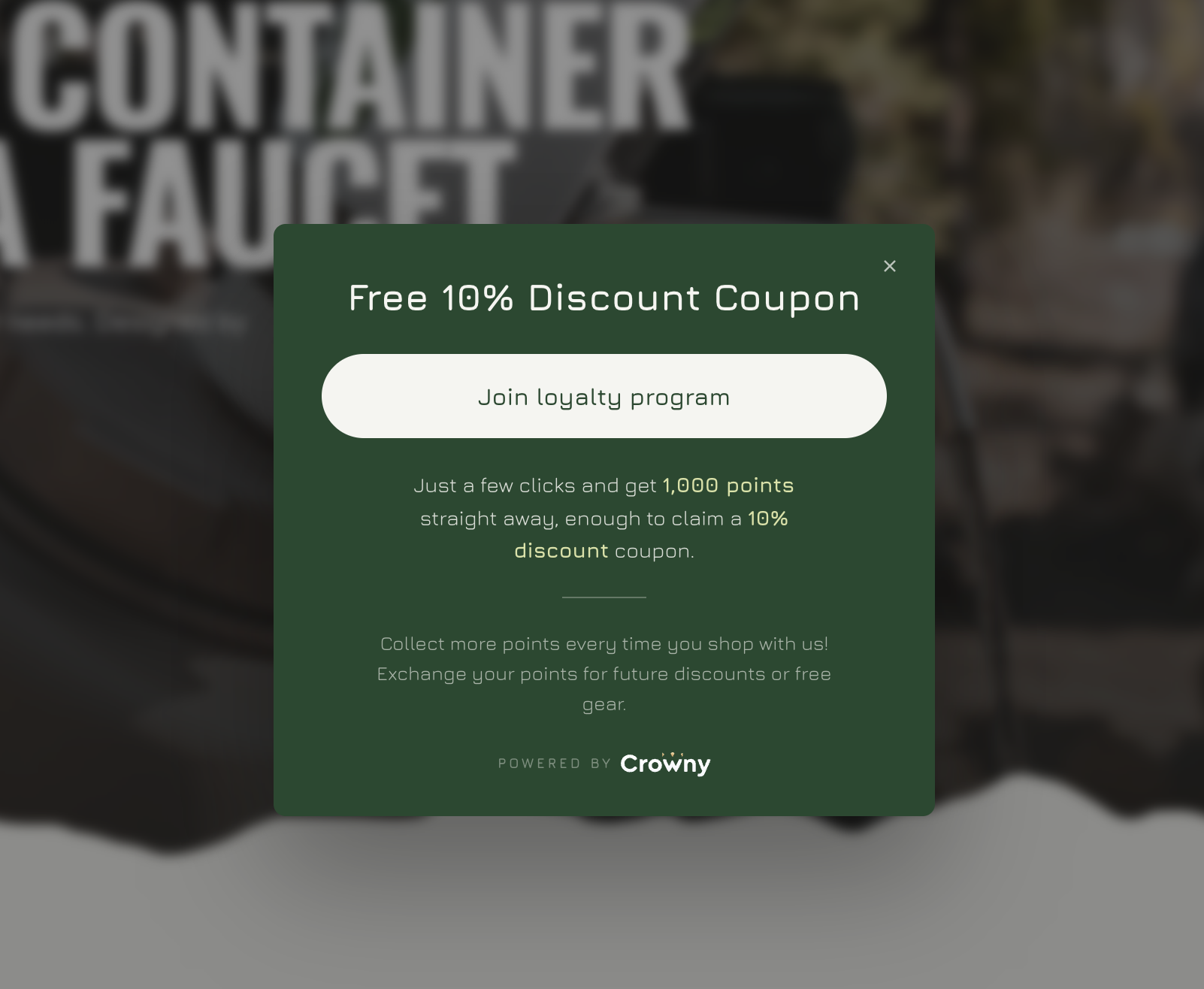
Look at the example above. The headline is not “Join our loyalty program”, it is “Free 10% Discount Coupon”. The visitor sees what they get before they read anything else, and the button tells them how to get it.
A good sign-up modal has four parts:
- A headline that names the reward.
“Free 10% Discount Coupon”, “Get 1,000 points today” or “Free shipping on your next order”. - One button.
“Join loyalty program”. One clear action, nothing that competes with it. - One sentence that explains the deal.
“Just a few clicks and get 1,000 points straight away, enough to claim a 10% discount coupon.” - A short line about what comes next.
“Collect more points every time you shop with us. Exchange your points for future discounts or free gear.”
That is all it needs. Visitors decide in a few seconds whether a popup is worth their time, so every extra line makes it less likely they click.
Connect the join button to Crowny
When a visitor clicks “Join loyalty program”, the Crowny widget should open on their screen, so they can sign up right away without leaving the page. Let the button call Crowny.open(). It opens the widget on its home screen, where visitors can join in a few clicks, and it works even on pages where the floating launcher button is not shown.
In your modal’s HTML that looks like this:
<button type="button" onclick="Crowny.open()">Join loyalty program</button>Close your own modal in the same click, so the widget is not hidden behind it. If your popup tool only lets you set a link instead of a script, link the button to ?widget-open=home on your store, for example https://yourstore.com/?widget-open=home.
Crowny.open() can also open the widget straight on another screen, and the widget has more methods, such as Crowny.close() and Crowny.isOpen(). See the storefront widget documentation for every option.
Make the incentive real
The modal only works when the promise is true. Make sure the sign-up reward you mention is active in your program, and that the number of points you hand out at sign-up is really enough for the reward you name. If 1,000 points buys a 10% discount coupon, say exactly that. A new member who finds out they need to collect more first will not trust the rest of your program.
Tips for a modal that converts
- Match your store. Use your own brand colours and fonts, so the modal looks like part of your store and not like an ad.
- Do not show it right away. Let visitors look around first. A modal that opens before the page has even loaded is closed without being read.
- Do not show it again and again. A visitor who closed it once has seen your offer. Showing it on every page gets in the way of shopping.
- Make it easy to close. A clear close button keeps the experience friendly, and visitors who are not ready yet can still join later through your loyalty page.
- Check it on mobile. Most of your visitors are on their phone. Make sure the text is readable and the button is easy to tap.
Use email and modals together
Email and a sign-up modal work best side by side. The email brings in the customers you already know, the modal catches every new visitor who lands on your store. Use the same reward in both, so the offer is easy to recognise wherever a customer sees it.
Not sent your invitation email yet? Read how to onboard customers via email.
Want help setting up your sign-up modal?
Our team is happy to help you choose the right reward and get your modal live on your store.